Bulk-generate & schedule posts in seconds with Smart Scheduling. Try now!
How to use Twitter advanced search – a complete guide
 Published by Wasiq Naeem
Twitter (X) has more than 300 million monthly active users. That’s millions of conversations every day about brands, products, news, and trends. Without Twitter advanced search, most of that insight disappears into the noise.
X advanced search lets you slice through that constant stream and surface the tweets, people, and conversations that matter for your campaigns. If used well, it can support your social media strategy, sharpen your social media marketing, and feed everything from content ideas to lead generation.
X (Twitter) Marketing Schedule perfectly crafted tweets and manage your X (Twitter) content with a unified content calendar.
In this guide, you’ll learn:
- What Twitter (X) advanced search is and how it works
- How to access Twitter advanced search on desktop and mobile
- A breakdown of every filter and search operator
- Practical ways agencies, brands, and social teams can use it every day
So let’s get started!
What is the Twitter advanced search?
Twitter advanced search is a built‑in tool that lets you run highly specific searches across public tweets. Instead of typing a keyword and scrolling through generic results, you can:
- Combine multiple keywords and phrases
- Focus on specific accounts or conversations between accounts
- Filter by dates, locations, engagement (likes, replies, retweets), and media
- Include or exclude replies, retweets, and links
For digital marketing agencies, social media teams, and brands, Twitter advanced search turns X from a fast-moving feed into a searchable data source for:
- Campaign research and planning
- Competitor and competitive intelligence
- Customer service and customer care strategy
- Lead generation and sales prospecting
- Content and SEO research
Mastering X advanced search is one of the simplest ways to improve your Twitter marketing strategy without buying extra tools.
Importance of Twitter’s advanced search in social media marketing
Among the many resources available to social media marketers, Twitter’s advanced search is a must-have for making the most of the platform’s massive data set. Before diving in, reviewing key Twitter statistics can give helpful context on user behavior and platform trends. Now let’s take a deeper dive into the importance of Twitter’s advanced search for social media marketing:
Smart searches using specific keywords
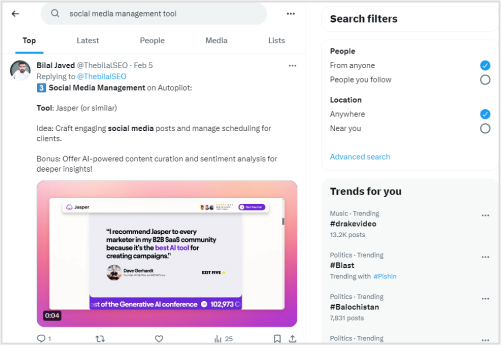
Advertisers run the danger of being inundated with irrelevant data when using basic search options. Conversely, marketers may use advanced search to zero in on certain campaign-related keywords, phrases, or hashtags via the use of precision keyword searches.
Also Read: How to Mute Words on Twitter (X)?
Monitoring competitors

Discussions for insight into the ever-changing social media landscape and keeping tabs on competitors are essential. In order to better understand their audience engagement, strategy, and brand perception, marketers can now more easily track competition activity using Twitter’s advanced search.
Related Read: How Competitive Intelligence Can Benefit Your Business?
Social Media Analytics Fine-tune your social media strategy for success with in-depth analytics and white-labeled reports.
Feedback from viewers
Knowing your audience inside and out is the first step to effective marketing. Using advanced search, marketers may talk to people who match their target demographic; this can help them learn about trends, problems, and customer preferences.
Also, we can help you develop a customer care strategy for your brand.
Identifying hot topics and hashtags in real-time
One certain way to get your company seen is to research popular Twitter (X) hashtags and topics and use them. Twitter’s advanced search allows companies to stay updated on current trends, join relevant discussions, and increase engagement.
Content Discovery Find the top-performing content on the web and never run out of social media post ideas.
Efficiently monitoring ads
The date and location filters in advanced search are priceless for time- or location-sensitive initiatives. To maximize results, marketers may track the ripple effects of events, analyze regional trends, and tweak their strategies accordingly.
How to access Twitter advanced search
You can use advanced search on both desktop and mobile web. The experience is slightly different depending on where you access it.
Twitter (X) advanced search on desktop
- Log in to your X account on https://x.com.
- Type a keyword or phrase into the search bar at the top and press Enter.
- On the results page, look for Search filters on the right-hand side.
- Alternatively, click Advanced search under that box.

- Or the second option is to go directly to https://x.com/search-advanced
You’ll see a detailed form where you can fill in words, accounts, dates, and more. Every field you add narrows the results X advanced search returns.
Twitter (X) advanced search on mobile
The full advanced search form does not appear directly inside the official X iOS and Android apps. To see it on your phone:
- Open a mobile browser (Chrome, Safari, Firefox, etc.).
- Go to https://x.com and sign in.
- Tap the search icon and run a simple search.
- On the results page, tap the three-dot icon next to the search box.
- Choose Advanced search to open the full filter form.
If you prefer the app, you can still use most of the advanced search by typing operators directly into the search bar (more on that below).
Need to search by date only? For step‑by‑step examples, check out this guide on how to search tweets by date.
Understanding Twitter advanced search filters and operators

The real power of advanced search comes from combining filters. Here’s what each section of the form does and when to use it.
Word and phrase filters
These fields control what appears in the tweet text.
- All of these words
Tweets must contain every word you enter, in any order.- Example: product launch feedback
- This exact phrase
Tweets must include a specific phrase in that exact order.- Example: “social media marketing strategy”
- Any of these words
Tweets can contain one or more of the words you list.- Example: SEO PPC “paid social”
- None of these words
Excludes tweets containing certain words, which is helpful for removing noise.- Example: Search for Apple but exclude fruit to focus on the company.
- These hashtags
Search within hashtags only.- Example: #ContentMarketing #SaaS
Language
Filter for tweets in a specific language.

Twitter advanced search also respects search operators in the regular search bar:
- Quotes for exact phrases: “social media marketing”
- Minus sign to exclude words: social media -Facebook
- Boolean-style operators: social media marketing OR digital marketing
Learn more about social media marketing!
Account and people filters
These fields focus your search on specific users and interactions:
- From these accounts
Shows tweets posted by one or more accounts.- Example: @contentstudioio (the X handle for ContentStudio)
- To these accounts
Shows tweets that are replies to a specific account. - Mentioning these accounts
Captures tweets where an account’s handle appears anywhere in the tweet.

These filters are essential for:
- Competitor research
- Influencer monitoring
- Tracking replies to your own support or brand accounts
You can also mimic these fields with operators in the main search bar:
- from:username
- to:username
- @username anywhere in the query
Date and timeframe filters
The date section tells when the tweets should have been posted.
- From / To dates
Set a start date, end date, or full range using the calendar picker.
Use this to:
- Analyze sentiment around a launch window
- Review how a trend developed over a week or month
- Compare engagement before and after a campaign
You can also type date operators directly:
- since:2024-01-01 until:2024-01-31 “brand name”
For a deeper look at finding older posts, revisit how to search tweets by date.

Engagement, replies, and media
These filters help you focus on more visible content.
- Minimum replies / likes / retweets
Set thresholds like min_faves:50, min_retweets:20, or min_replies:10 by typing them in the search bar. - Replies
Decide whether to:- Include all tweets
- Show replies only
- Exclude replies
- Links and media
Use these operators in the main search box:- filter:links – tweets that contain a link
- filter:media – tweets with images or video
- filter:images / filter:videos – narrow by media type
This turns Twitter advanced search into a content research tool—for example, finding highly engaged threads, popular articles, or visual content in your niche.
Location and place filters
With X advanced search, you can filter tweets by location, which is handy for local campaigns.
- Near this place
Searches tweets sent from a specific city, state, or country (based on geotagging or profile location). - Within this distance
Adds a radius around that location (e.g., within 10 miles).
You can also type:
- pizza near:Chicago within:10mi
Use location filters to:
- Monitor event chatter near a venue
- Find local prospects for brick‑and‑mortar businesses
- Compare interest in different regions or cities
Keep in mind: location data depends on user settings, so it’s not perfect (more on limitations later).
Extra operators: sentiment, questions, and exclusions
You can refine Twitter advanced search even further with a few simple tricks:
- Approximate sentiment
- Positive: brand name 🙂 or brand name “love” (research on Twitter Sentiment Analysis using machine learning shows how these patterns correlate with positive sentiment)
- Negative: brand name :(“problem” OR “hate” OR “broken”)
- Questions
Add ? to surface questions:- “social media tools”?
- Exclude brands or topics
Use the minus sign to remove topics:- coffee AND #morningroutine -Starbucks
If certain topics flood your feed while you work with Twitter advanced search, you can also mute words on Twitter (X) to keep your timeline cleaner.

Read Up: Social Media Collaboration: How to Make It Work?
5 practical ways to use Twitter advanced search for business
Once you know how the filters work, the next step is turning advanced search into daily workflows. Here are powerful ways social teams, agencies, and brands can use it.
1. Analyze competitors and gather intelligence
Twitter advanced search is perfect for ongoing competitive intelligence.
How to search:
- from:@competitor min_faves:20 – see their stronger tweets
- “competitor name” OR @competitor – see what others are saying about them

Why it helps:
- Spot the content themes that work for them
- See how they handle complaints or praise
- Identify gaps you can fill with your own messaging
- Compare their audience’s tone and topics with your own mentions
2. Understand your audience’s interests and pain points
Agency and in‑house teams need to know what people actually talk about not just what shows up in reports. Advanced search on X lets you listen at scale.
How to search:
- “your product category” “recommend”?
- “your niche” “struggling with” OR “frustrated with”

Use these searches to:
- Collect real phrases people use to describe their problems
- Find common objections, blockers, and decision triggers
- Identify recurring questions your content should answer
Combine these searches with a solid B2C social media marketing plan to build content and offers that match real‑world questions and frustrations.
3. Upgrade customer care and support
Smart customer care lives where your customers already talk. Twitter advanced search is a key part of an effective customer care strategy for your brand.
How to search:
- “brand name” (“help” OR “support” OR “can someone”)
- to:@yourSupportHandle
Then build workflows using this guide on how to create a customer care strategy for X. Respond quickly, track recurring issues, and use what you learn to fix root problems.
4. Generate leads and sales opportunities
Sales teams can treat Twitter advanced search as a real‑time intent engine.
Try queries like:
- “looking for” “social media tool” ?
- “recommend” “agency” “city name”
- “anyone know” “CRM” ? near:NewYork within:25mi

Used thoughtfully, this helps your team start helpful, context‑aware conversations with people who already expressed a need—without coming across as pushy.
5. Recruit talent and build your employer brand
Recruiters and hiring managers can also benefit from Twitter advanced search.
How to search:
- “content marketer” “open to work”
- “social media manager” “looking for a new role”
- Add location filters for on‑site roles.

Pair this with content that shows your company culture on X, and build direct relationships with potential candidates by joining relevant conversations instead of sending cold messages.
Conclusion
Twitter advanced search gives social media marketers direct access to real-time conversations, emerging trends, and practical signals from the platform itself. By learning how its features work and using thoughtful search tactics, marketers can sharpen their Twitter marketing efforts with far more precision.
The payoff is clearer insight into what audiences care about right now and better timing when joining those conversations. To make the most of one of the most dynamic platforms on the internet, include Twitter’s advanced search in your social media marketing toolbox.
FAQs
How does the Twitter search algorithm operate?
The Twitter algorithm, which is a collection of guidelines and limitations, determines what content appears on each user’s timeline. The Twitter (X) algorithm selects what and how we receive content based on a variety of parameters, including media content, region, reactivity, personal preferences, and virality.
Do deleted tweets appear in Twitter Advanced Search?
If you need to find older or deleted tweets, Twitter Support could recommend utilizing Twitter’s Advanced Search. You may utilize Twitter’s helpful Advanced search feature to find deleted tweets.
Can I use Twitter advanced search to find tweets with images or videos?
Yes. You have two options:
-
In the interface, run your search, then click Photos or Videos on the results page.
-
In the search bar, add:
-
filter:mediafor any media -
filter:imagesfor images -
filter:videosfor videos
-
Combining these with keywords and account filters turns Twitter advanced search into a focused content discovery tool.
Recommended for you












Powerful social media management software
14-day free trial - No credit card required.