Bulk-generate & schedule posts in seconds with Smart Scheduling. Try now!
How to turn off active status on instagram in 2026 (Step-by-step guide)
 Published by Sadia
If you feel like that little green dot on Instagram keeps you “on call” all day, learning how to turn off active status on Instagram can make a real difference. It can feel like you never log off, even when you’re just checking one quick message.
Whether you manage multiple brand accounts, run client campaigns, or create content, knowing how to hide active status on Instagram lets you check DMs, post content, and review analytics without everyone seeing when you’re online or expecting an instant reply.
This guide walks you through how to hide your online status on Instagram on both mobile and desktop, explains what Activity Status actually shows, what changes when you switch it off, and how it affects things like Reels, DMs, and related privacy settings.
Instagram Marketing Schedule your Instagram posts, Reels, and Stories, and get recommended best time to publish for maximum engagement.
What Instagram activity status actually shows
Before you decide how to turn off active status on Instagram, it helps to understand what the feature does.
Instagram’s Activity Status tells people when you’re currently active or were last active on the app. It appears mainly in Direct Messages (DMs) and a few other interaction screens, across both mobile and desktop.
You’ll see (and share) status in three main ways:
- Green dot: A green dot appears next to your profile picture, meaning you’re active on Instagram right now.
- “Active now” label: Text that reinforces the green dot and confirms you’re currently using the app.
- Last active timestamp: If you’re not online, Instagram may show “Active 25m ago,” “Active 3h ago,” or “Active yesterday.”
Who can see your activity status?
Your status is not public to everyone on Instagram. It is visible only to:
- People you follow
- People you’ve exchanged Direct Messages with
Random users you haven’t followed or messaged cannot see when you’re online, whether you use a personal, creator, or business account.
This visibility can still feel intrusive if you manage clients, run campaigns, or get a high volume of DMs. That’s why many social media managers look for ways to hide their online status on Instagram and keep their work time more controlled.
Related Read: Can You Turn Off Read Receipts on Instagram?
How to turn off active status on Instagram on your mobile phone
If you prefer to work from your phone, follow these steps to turn off active status on Instagram in the mobile app (iOS or Android). The process is nearly identical on both platforms.
Follow these steps to browse in peace without letting the world know you’re online.
Step 1:
Grab your smartphone and log in to your Instagram app. Tap your Profile icon at the bottom right to open your profile page.
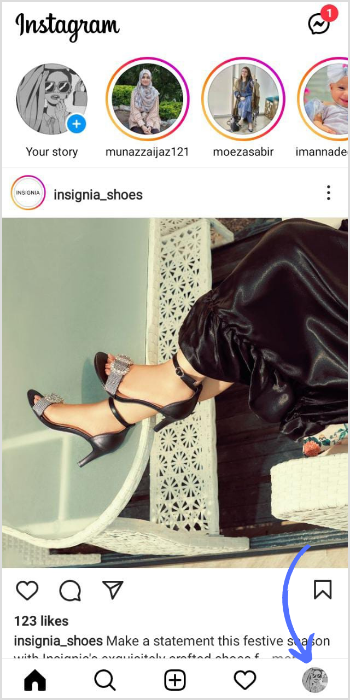
Step 2:
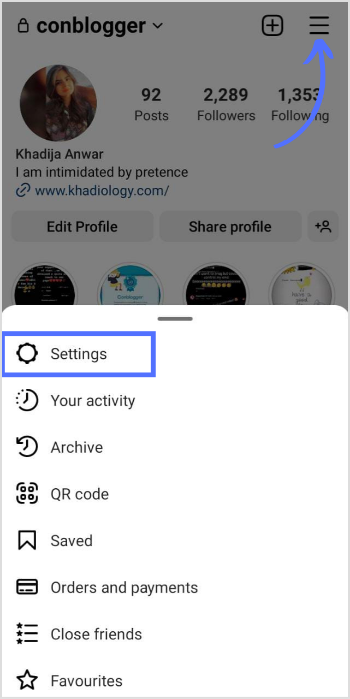
Tap the hamburger icon (three horizontal lines) in the top-right corner to open the menu. From there, tap Settings and privacy, depending on your app version.
Step 3:
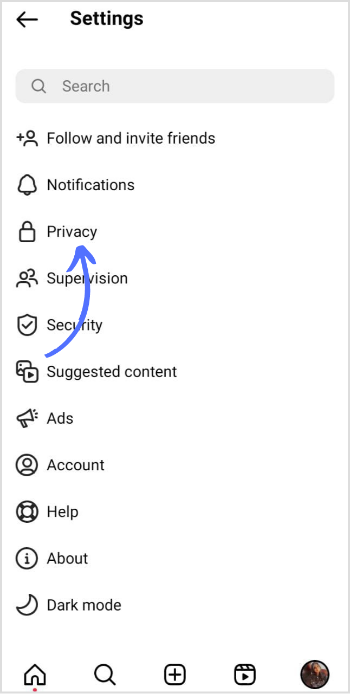
On the settings page, tap “Privacy” near the top of the list.
Step 4:
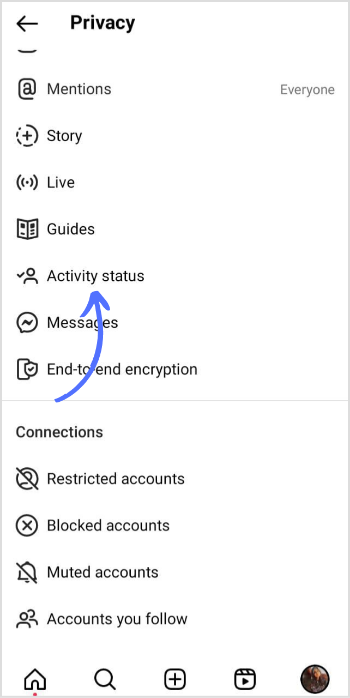
In Privacy settings, look for Activity status (on some accounts, this may appear under Messages and story replies as “Show Activity Status”). Tap it to open your activity options
Step 5:
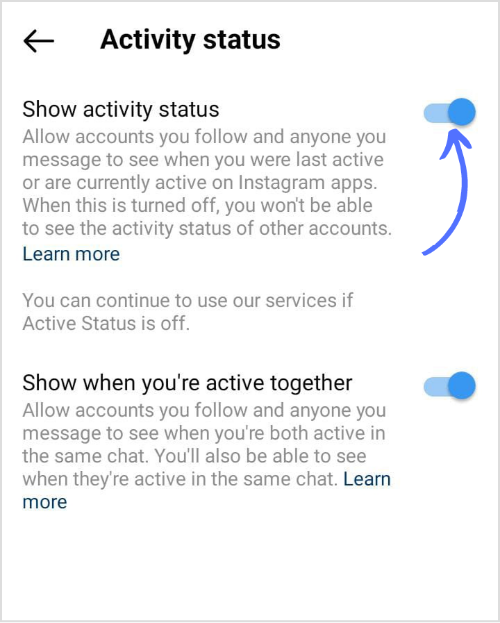
By default, the Show Activity Status toggle is turned on, which means your online status is visible to others. Simply switch the toggle off.
Once you do this:
- People will no longer see the green dot or “Active now” next to your name in DMs.
- They won’t see how long ago you were last active.
- You also won’t be able to see other people’s activity status.
If you’re specifically wondering about active status on Reels, this same setting covers your presence across the app. Turning Activity Status off hides your online indicator, but it does not affect how your Reels are shown or ranked.
This is the simplest way to hide your active status on Instagram from your phone.
Also read: How to Make a Group Chat in Instagram?
Turn off active status on Instagram on your PC
If you work from a laptop or desktop during the day, here’s how to turn off active status on Instagram from your browser.
Here are the steps to turn off your active status on Instagram while using your PC:
Step 1:
Open Instagram.com in your preferred web browser (Chrome, Firefox, Safari, Edge, etc.) and log in to your account. Once you’re on the home feed, click More (three horizontal lines) at the bottom left of the screen.
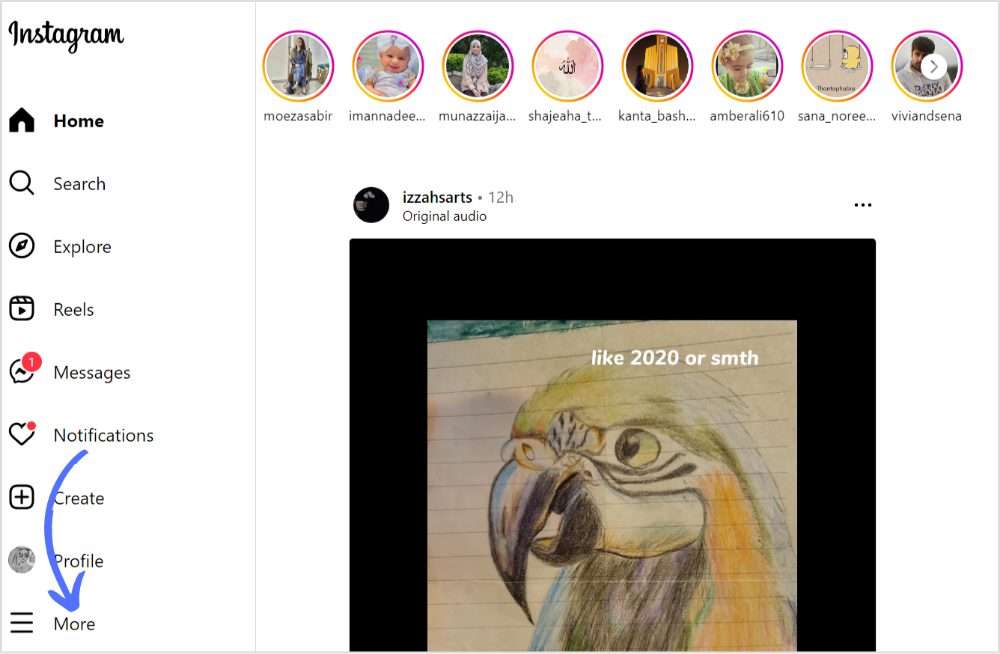
Step 2 & 3:
- In the pop-up menu, click Settings.
- Under the section that covers how others can interact with you, click Privacy or Messages and story replies, depending on what you see.
Click Activity status or Show Activity Status, then uncheck the box or toggle the switch to turn off your online status.
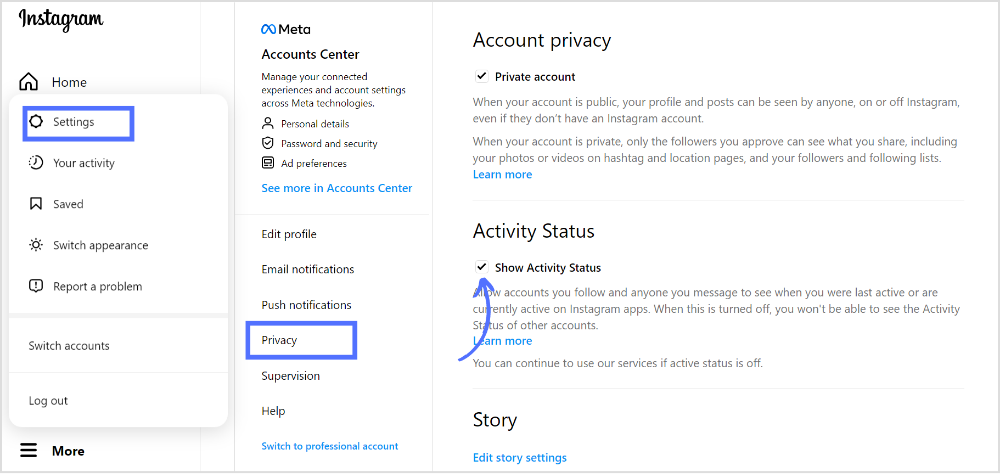
Remember, if you ever decide to turn your activity status back on, simply follow the same steps and toggle the switch to On.
Enjoy your added privacy, whether you’re managing brand accounts from your desk or casually scrolling between tasks.
What happens when you hide your Instagram activity status
Turning off active status on Instagram is about more than just removing the green dot. It changes what you and others can see inside DMs.
What others stop seeing
When your Activity Status is off:
- No one can see the green dot showing you’re “online.”
- “Active now” and “Active x m/h ago” labels disappear next to your name in DMs.
- People can’t tell if you’re currently in the same chat with them.
They’ll still see:
- Your posts, Stories, and Reels
- Your likes and comments
- When you follow or unfollow accounts
So while this setting hides your online status, it doesn’t completely hide your presence on the platform.
What you stop seeing
The feature works both ways. When you hide your own status:
- You can’t see anyone else’s green dot.
- You lose “Active now” labels for other accounts.
- You no longer see last active timestamps in your DM list.
Think of it as a mutual privacy rule: to see others’ status, you must share your own.
Why marketers and creators turn off activity status
If you’re running social media for clients, brands, or your own business, turning off active status on Instagram can be surprisingly helpful.
Here’s why many professionals choose to hide it:
- Less pressure to reply instantly
When contacts see you as “Active now,” they often expect a quick response. Turning off your status lets you answer DMs on your schedule—not every time you open the app. - Cleaner focus while working
You can log in to upload content, check performance, or respond to priority messages without triggering a wave of “Hey, you’re online!” messages. - Better boundary between work and personal time
For social media managers juggling multiple roles, hiding your online status keeps evenings and weekends from turning into support hours. - Fewer unwanted conversations
Some people message only when they see you online. When you hide online status on Instagram, these “saw you were active” pings tend to drop. - Peace of mind while publishing Reels and Stories
You can keep scheduling and posting Reels consistently, even with active status off Reels and the rest of the app, without signaling to everyone that you’re currently inside the app. - Scheduling without being online
With a planning tool like ContentStudio, you can schedule posts, Reels, and Stories to go out automatically, so your content stays active even when your Activity Status does not.
Related Instagram privacy settings to review
Turning off Activity Status is a great start, but there are a few other privacy controls you may want to adjust as well, especially if you manage brand accounts.
Read receipts in Direct Messages
Activity Status and read receipts are separate settings.
Even if you turn off active status on Instagram, people can still see “Seen” when you open their messages, unless you disable read receipts.
To turn off read receipts:
- Go to Settings and Privacy.
- Tap or click Messages and story replies.
- Select Show read receipts.
- Toggle the setting off.
Just like Activity Status, this is reciprocal; if you turn off read receipts, you won’t see when others have read your messages either.
Story replies and message requests
Control who can contact you in the first place:
- Limit who can reply to your Stories (everyone, people you follow, or no one).
- Adjust who can send you DM requests (everyone, people who have your profile, or followers only).
- Filter or restrict spammy accounts.
These options live under Messages and story replies in Settings and privacy.
Activity status vs. Threads and other Meta apps
Your Instagram activity status is separate from:
- Facebook’s active status
- Messenger’s active status
- Threads status
If you use Threads or other Meta apps, you’ll need to adjust each app’s privacy settings separately. Turning off active status on Instagram does not switch it off everywhere else.
FAQs
Can you hide your active status on Instagram from one person?
No, you can’t hide your active status on Instagram from only one person. The setting applies to your entire account. If you turn it off, it’s off for everyone.
To turn it off for all:
- Go to your Instagram profile settings.
- Tap Privacy (or Messages and story replies).
- Tap Activity status / Show Activity Status.
- Turn off the toggle.
If you want to limit it to just one person, you can restrict, mute, or block them instead of changing your status.
Will anyone be notified if I turn my Activity Status on or off?
No. Instagram does not send any notification when you change this setting. People will simply stop (or start) seeing your green dot and “Active now/ago” labels, without any alert.
If I turn off my Activity Status, can I see who was active while it was disabled?
No. Activity Status works in real time. When you switch it off, you stop receiving that data. When you turn it back on, you’ll only see others’ status from that point forward.
Does turning off my Activity Status completely hide my presence?
Not entirely. Turning off active status on Instagram hides:
- The green dot
- “Active now”
- Last active timestamps
But people can still infer that you’re active if:
- You post a Reel, Story, or photo
- You like or comment on content
- You follow or unfollow accounts
What’s the quickest way to remember how to turn off active status on Instagram?
Think of it in three short steps on any device:
- Open Settings and privacy.
- Go to Messages and story replies or Privacy.
- Tap Activity status / Show Activity Status and toggle it off.
Follow the same steps in reverse to turn it back on and see others’ status again.
Recommended for you

How to turn off active status on instagram in 2026 (Step-by-step guide)






Powerful social media management software
7-day free trial - No credit card required.