Bulk-generate & schedule posts in seconds with Smart Scheduling. Try now!
How to change your TikTok username and display name the right way
 Published by Saif Ali
A TikTok username is one of the most important parts of your profile. It affects how easily people can find you, remember you, and tag you in content. If you’re trying to figure out how to change your TikTok username without hurting your visibility or confusing your audience, you’re in the right place.
A strong and memorable username can help you reach a wider audience. On a platform with a massive 1.04 billion TikTok users, a weak or forgettable handle makes it harder for viewers, clients, and collaborators to track you down.
This guide walks you through how to change your TikTok username and display name (nickname) the right way from both mobile and desktop, plus the rules and best practices social media teams and brands should know before making the switch.
Plan, schedule, share, and analyze content for 15+ social media channels.
Try ContentStudio for FREE
TikTok username vs display name: what’s the difference?
Before you learn how to change your TikTok username, it helps to understand the two different names on every profile.
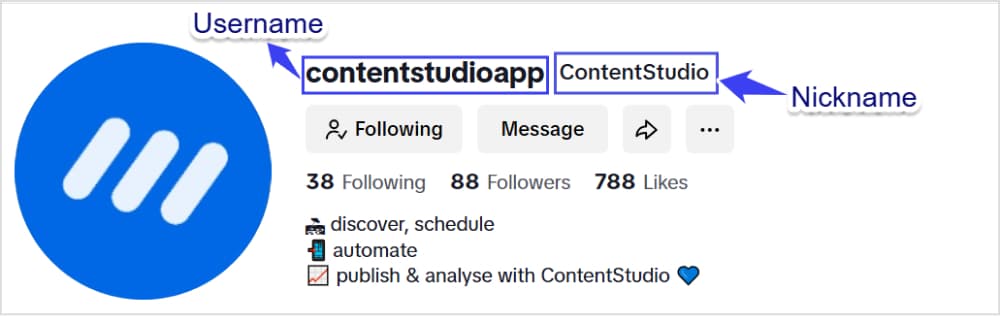
Username (handle)
Your username is the @handle everyone sees and uses to tag you, for example, @YourBrandName.
Key traits:
- Must be different from every other TikTok account
- Appears in your profile URL: https://www.tiktok.com/@YourBrandName
- Used for mentions, tags, and most direct searches
- Must follow TikTok’s formatting rules (more on those below)
Think of this as your permanent identifier and a core part of your brand’s social media platforms strategy.
Display name (nickname)
Your display name sits above your username on your profile and appears on videos and comments.
Key traits:
- Does not have to be exclusive to you
- Can include spaces, special characters, and even emojis
- Can be up to 30 characters
- Can be changed more often than your username
Brands often use the display name for the full business name, a campaign slogan, or extra context. Your username keeps things consistent; your display name lets you be more expressive.
How to change your TikTok username on mobile
You can change your username directly from the TikTok app. Here’s how to change your TikTok username and display name on a phone, starting with the username.
Step 1: Open the TikTok App
Launch the TikTok app on your smartphone. Ensure you’re logged into the account where you want to change the username.
Tap the Profile icon located in the bottom-right corner of the screen.

Step 2: Access your profile settings
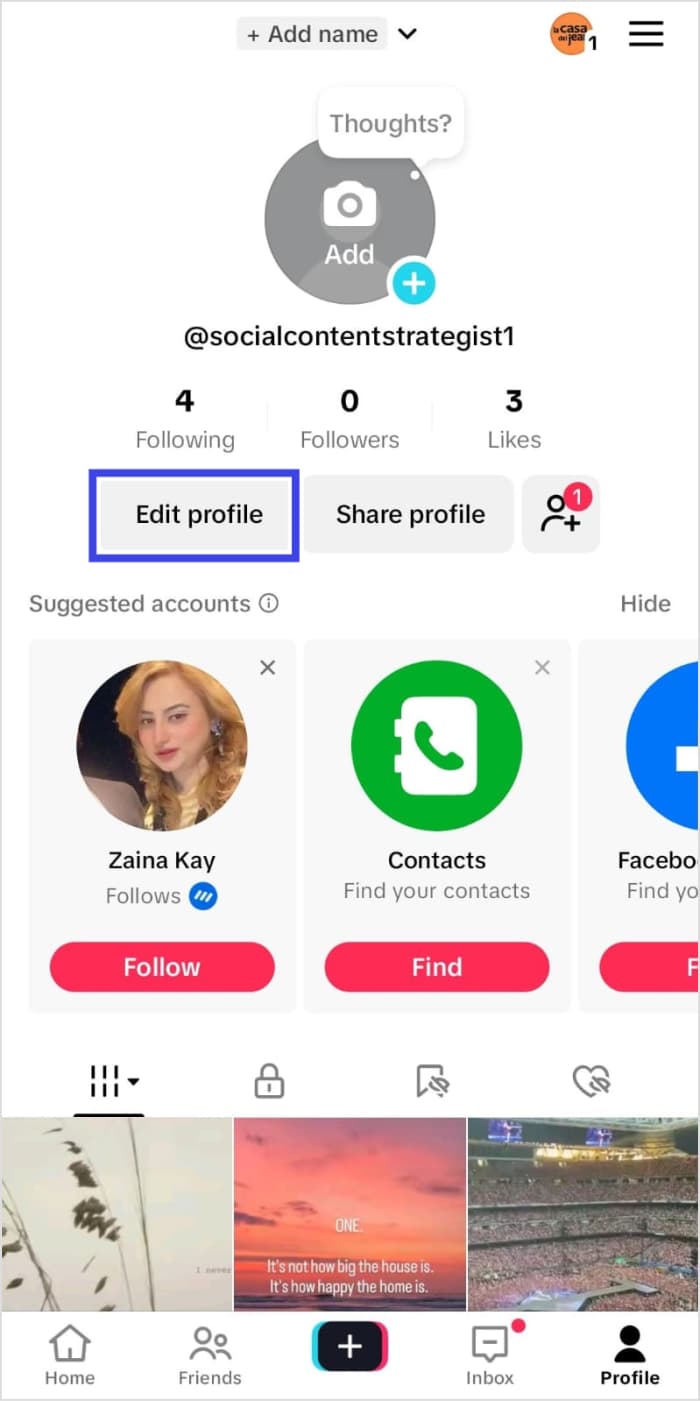
On your profile page, tap the Edit Profile button located below your profile picture and bio.
Step 3: Edit the username and display name
Under the “Edit Profile” section, you’ll see multiple options to edit your TikTok profile, including:
- Name: This is the display name or nickname of your TikTok profile visible to other users.
- Username: This is the TikTok name that contains the tag and is displayed on your profile, along with being a part of the profile link.
- Bio: You can add or edit the short bio of your profile.
- Links: Include relevant links to display on your TikTok profile, typically for marketing purposes.
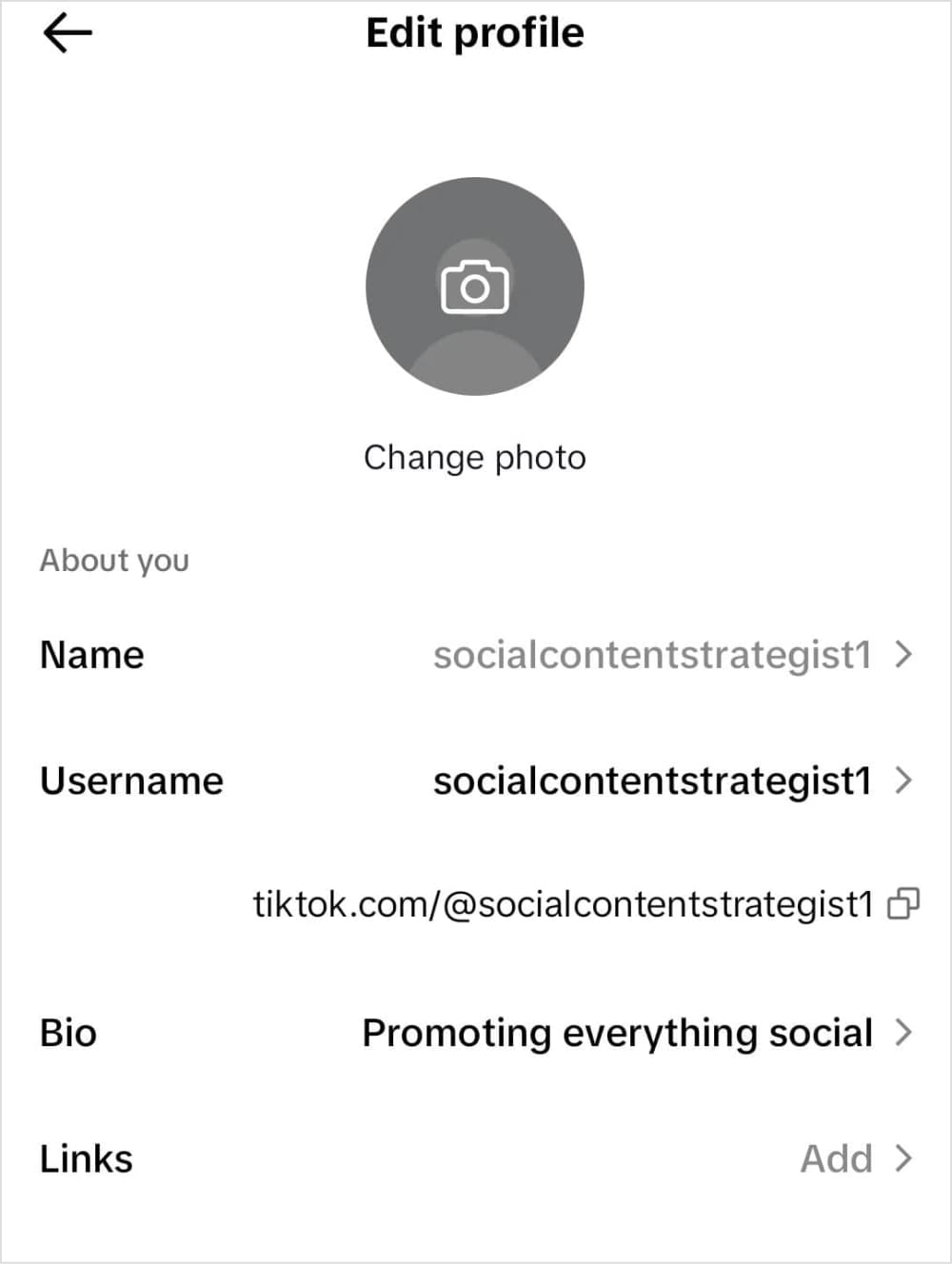
If you want to change your username, tap on your current username and choose a new suitable username.
Keep in mind that your TikTok username can contain only letters, numbers, periods, and underscores with a limit of 24 characters. Moreover, you can only change your username once every 30 days, so you must be very careful during this process.
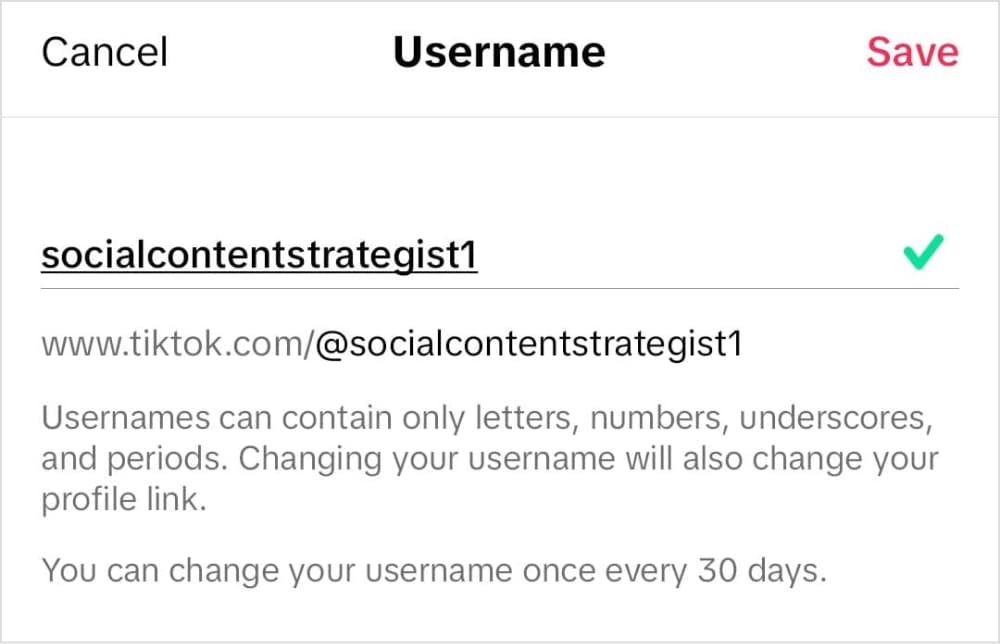
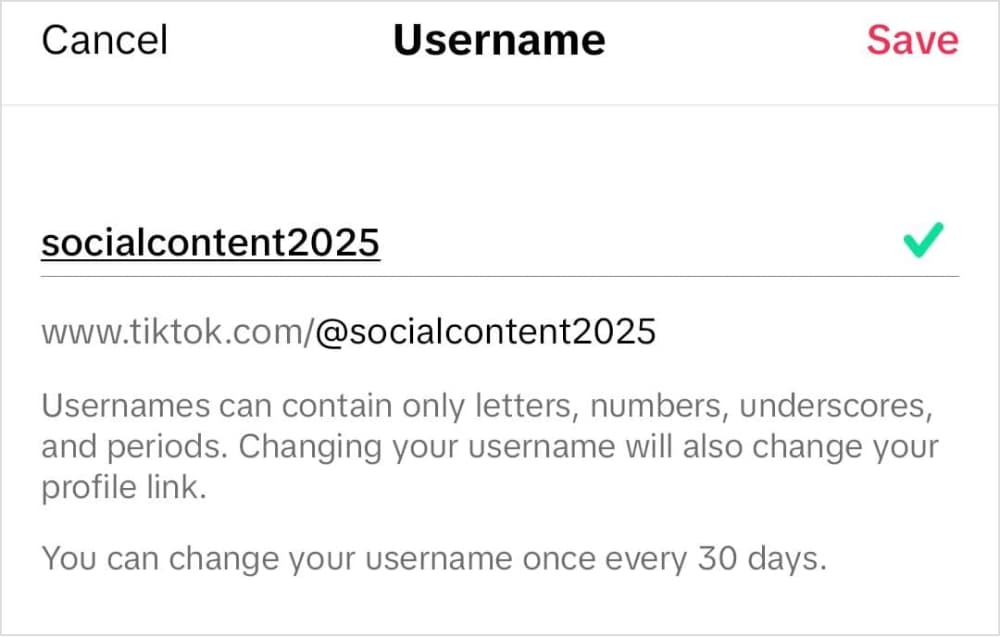
Once you have changed your username, tap the Save option to make the changes.
The process of changing your TikTok name is also quite similar. You have to tap on your current name and then write a new one. Unlike with the TikTok username, you can get creative in choosing a nickname by adding special characters. Moreover, your TikTok name can be up to 30 characters.
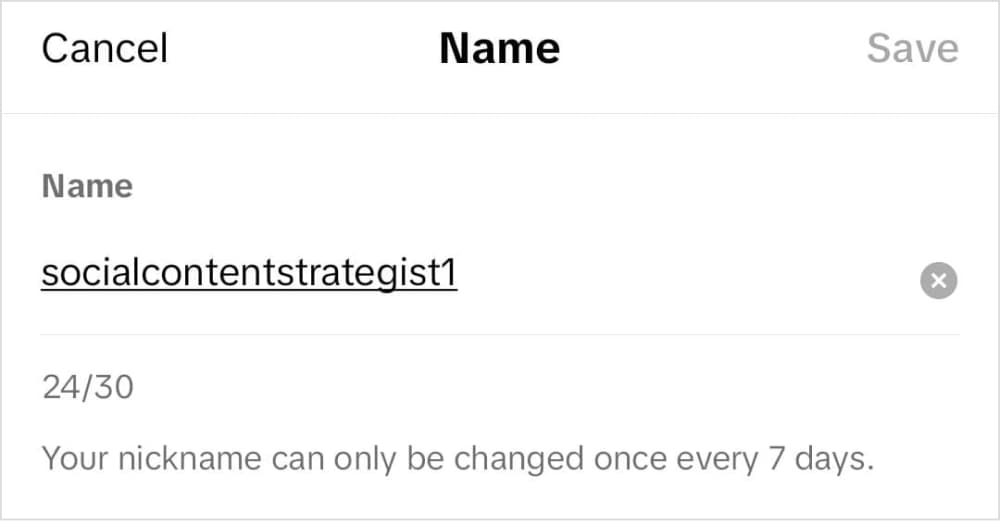
Hence by following these quick and simple steps, you can easily change your TikTok username and nickname as per your liking.
How to change your TikTok username on desktop
If you prefer working from a computer, you can also change your username from the TikTok website.
Step 1: Open TikTok and login to your account
First of all, open the TikTok website in your web browser. Make sure you are logged in to the right account where you want to change the username or nickname.
Step 2: Open your profile
Click on the profile button in the left bar to access your TikTok profile posts and edit settings.
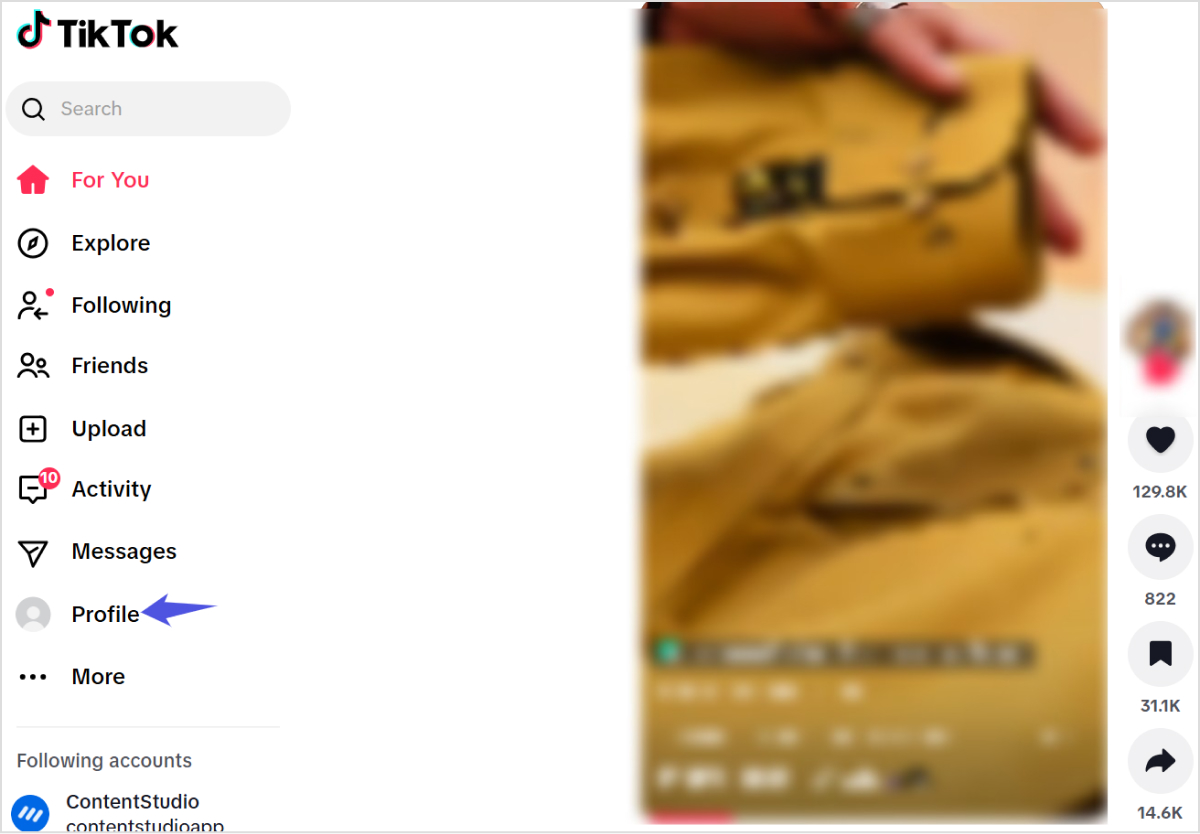
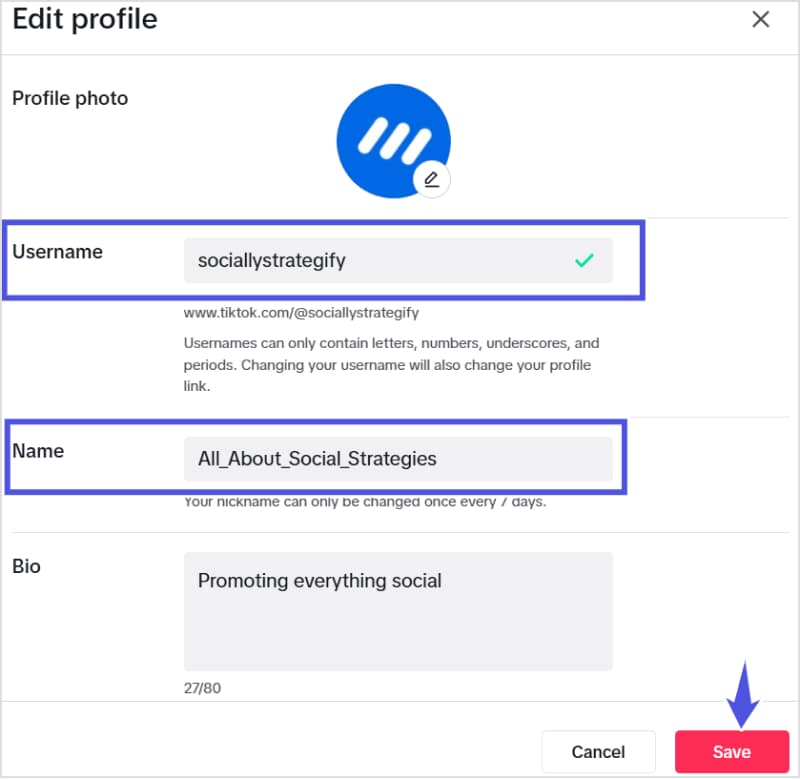
Step 3: Edit your TikTok profile
Under the TikTok profile, you will find the option to Edit profile located below your current TikTok name. Click on it to access the editing options.

Step 4: Edit your TikTok username or display name
TikTok provides multiple editing options through which you can modify your username, display name (nickname), and bio description. Enter your new username and/or name in the relevant fields and click on the Save button to successfully save the changes.
How to choose the right TikTok username and display name
Changing your handle is easy. Choosing the right name is what really matters, especially for marketers and brands that care about discoverability and consistency across social media platforms.
Below are practical guidelines on how to change your TikTok username and display name in a way that supports your growth.
1. Keep your username simple and memorable
Aim for a username that’s:
- Short and easy to say out loud
- Easy to spell and type
- Free of long strings of numbers or random symbols
For example:
- Better: @dancingrose
- Weaker: @dancing_rose_123
The simpler the handle, the easier it is for users to tag you correctly and remember you. If people stumble when pronouncing or spelling your name, they’re less likely to search for you later.
2. Align with your brand and niche
Your username and display name should reflect your brand or content focus:
- Agencies: @AgencyNameSocial, @AgencyNameMedia
- Local businesses: @BrandNameCity, @BrandNameOfficial
- Creators: @TechGuideTom, @ChefLenaKitchen
Also think about:
- The audience you want to attract
- The tone of your content (educational, entertaining, authority, etc.)
- Long-term plans (for example, expanding from local to global)
Consider how your handle supports your broader brand identity and marketing strategy.
3. Maintain cross-platform consistency
If possible, use the same or very similar username across:
- TikTok
- X (Twitter)
- YouTube
This makes it far easier for users to find you everywhere after discovering you on one channel. It also keeps your social media profile system clean and professional.
If your exact handle isn’t available on all networks, create a pattern you can repeat, such as:
- @BrandNameHQ
- @BrandNameOfficial
- @BrandNameSocial
4. Use keywords for discoverability
TikTok is now a powerful search engine. Names that hint at your niche help users quickly understand your content — and can also support TikTok SEO: How to rank high on TikTok?.
Ideas:
- Include your niche in your username:
- @NYCRealtorSam
- @B2BMarketingLab
- @VeganBakerJess
- Use keywords in your display name:
- ContentStudio | Social media management
- Alex | TikTok growth tips
- Lena – Easy home recipes
Avoid stuffing keywords. A clear, human-readable name almost always beats a spammy one stuffed with phrases.
Related: Unlocking the power of brand identity
5. Make your display name descriptive
You can use your display name to quickly explain what you do:
- Add your role:
- Sarah | Paid social strategist
- Mike – Short-form video coach
- Add your brand plus a benefit or category:
- ContentStudio – Social media tool
- BrightBites – Healthy recipes
Combined with a clear username, this gives new visitors instant context when they land on your profile.
A simple checklist for your display name:
- Does it say who you are?
- Does it hint at what you post?
- Is it easy to read on a small screen?
If you can answer “yes” to all three, you’re in great shape.
What to do if your desired username is taken
With so many TikTok accounts, your first choice may already be gone. Here are practical ways to get close to your ideal handle without sacrificing professionalism.
- Add a short prefix or suffix
- @TheContentStudio
- @ContentStudioApp
- @UseContentStudio
- Include your niche or industry
- @ContentStudioSocial
- @ContentStudioMarketing
- Add your location
- @ContentStudioNYC
- @AgencyNameLA
- Use an underscore for readability
- @content_studio
- @brand_name_social
- Avoid random number strings
- @BrandName99 is manageable
- @BrandName827364 looks spammy and is hard to recall
You can also try:
- Switching the word order (@StudioContent vs. @ContentStudio)
- Using abbreviations (@ContentStd, @CSocial) if they still feel clear
If a handle is taken by an inactive account, there’s usually no formal way to claim it. Plan for a version that you can use long-term.
Special considerations for brands and agencies
If you run client accounts or an established brand channel, changing your TikTok username and display name requires extra care.
Announce the change to your audience
A sudden handle change can confuse followers and hurt trust. To avoid this:
- Post a short video explaining the upcoming change and why it’s happening.
- Pin that video to your profile for a few weeks after the change.
- Mention the old handle in the caption: “Formerly @OldHandle, now @NewHandle.”
This is especially helpful for agencies handling rebrands or consolidations, where multiple accounts may merge into one.
Audit and update all external links
Once you change your username:
- Update TikTok links on:
- Your website and blog
- Email footers
- Other social bios
- Paid social ads
- Link in bio tools
- Coordinate with your team so no one continues sharing outdated links.
- Check scheduled posts and templates in your social media tools to confirm they contain the correct handle.
This prevents traffic loss and helps make sure every campaign still sends people to the right profile.
Use ContentStudio’s TikTok username generator
Finding the perfect username can be challenging, which is why many creators turn to specialized tools for inspiration.
ContentStudio’s free TikTok Username Generator stands out as a particularly useful resource. This tool combines AI-powered suggestions with customization options to generate unique username ideas based on your niche and target audience.
Most importantly, you can use the TikTok username generator for free to spark creativity when you’re feeling stuck or provide variations of usernames you’re considering.
Remember that TikTok limits username changes to once every 30 days, so take your time with this decision.
Ultimately, the right username acts as a foundation for your TikTok success, combining discoverability with brand identity.

Conclusion
Changing your TikTok username or nickname is a simple process that can make a big difference in how you’re perceived on the platform. By following the easy steps discussed in this article, you can update your username to better reflect your identity, brand, or content niche.
If you’re unsure about what username to choose, don’t worry—getting creative has never been easier! Use ContentStudio’s free TikTok username generator to discover unique, catchy, and relevant username ideas tailored to your style.
Remember, your TikTok username and display name are much more than just a name— they are your digital signature.
So take the plunge, update your profile, and let your creativity shine on TikTok!
FAQs
Can I change my TikTok username?
Yes, you can change your TikTok username! TikTok allows users to update their usernames directly from the app or website. However, you can only change it once every 30 days, so make sure you’re satisfied with your choice before saving it.
What are the rules for TikTok usernames?
TikTok usernames must follow these guidelines:
- Usernames can only contain letters, numbers, underscores (_), and periods (.).
- Usernames cannot end with a period or contain consecutive periods.
- Your username must be unique and not already taken by another TikTok user.
- The username must adhere to TikTok’s Community Guidelines, avoiding offensive or inappropriate language.
- Your TikTok username can be of a maximum of 24 characters.
How can I change my TikTok name without waiting 30 days?
TikTok doesn’t officially allow users to bypass the 30-day restriction for changing usernames. If you urgently need a new username, you can:
- Contact TikTok Support through the app and explain your situation. While there’s no guarantee, they may assist in exceptional cases.
- If you’ve just created the account and made an error, consider starting a new account with the desired username.
What is a good TikTok username?
A good TikTok username is:
- Short and Simple: Easy to remember and spell.
- Relevant: Reflects your content niche or personal brand.
- Unique: Stands out and avoids confusion with other creators.
- Consistent: Matches your usernames on other social platforms if possible.
- Creative: Uses clever wordplay, alliteration, or niche-specific terms.
If you’re struggling to come up with ideas, use ContentStudio’s free TikTok username generator to find unique and catchy options that fulfill your interests and style!
Recommended for you



How to turn off active status on instagram in 2026 (Step-by-step guide)









Powerful social media management software
7-day free trial - No credit card required.